

Pinyon leverages a robust combination of GIS and CAD technologies to offer comprehensive solutions for data visualization and analysis. Combining these tools allows Pinyon to offer customized, detailed, and versatile data presentations and deliverables, tailored to the specific needs of clients and projects.
Global Information Systems (GIS)
Pinyon specializes in providing environmental consulting services through advanced GIS technologies. Our mission is to assist clients in making data-driven environmental decisions, promoting sustainability, and enhancing natural resource management.
Pinyon utilizes GIS technology to improve project data collection, data management, analysis, and flow. Using the available suite of ESRI GIS tools, Pinyon streamlines data collection and management process to provide a more collaborative effort with all members of the project team. By applying ArcGIS technology, Pinyon provides our clients with the tools they need to visualize and manage data, enhance communication, and drive strategic decisions.
Some examples of how Pinyon has used GIS to enhance the project experience include:
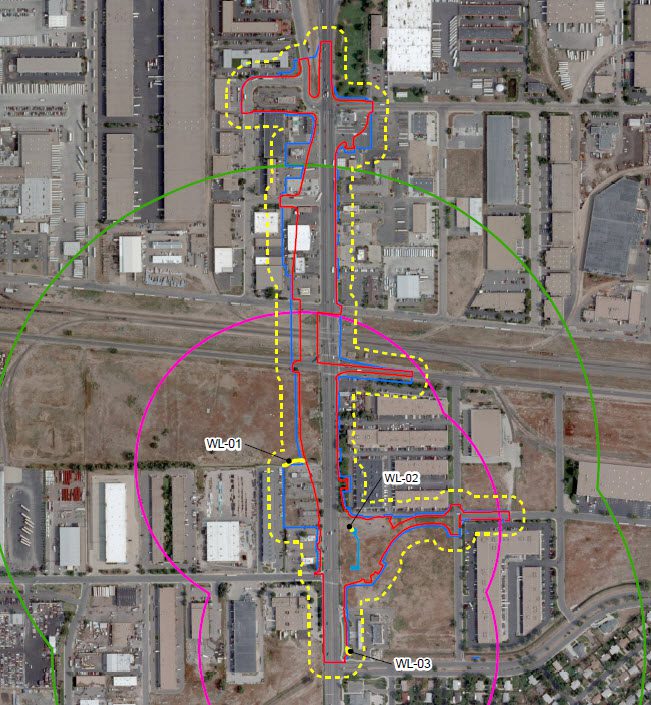
- Creating project-specific online resource maps to house all the spatial data for the project including environmental data, project design, and impacts.
- Creating visual exhibits in various formats (KMZ, DGN, DXF, DWG, SHP, GDB) which can be utilized by design teams to minimize avoid impacts to sensitive resources.
- Creating tablet-based field maps with project elements and sensitive resources to help focus field surveys and save time.
- Streamlining large-scale field surveys with Survey123 for ArcGIS.
Computer Aided Drafting & Design (CAD)
Pinyon has broad expertise in both Autodesk – AutoCAD Civil 3D and Bentley – Open Roads Designer (ORD), routinely providing engineering plans, such as:
- Stormwater Management Plans
- Radon Mitigation Design for New Construction
- Spill Prevention, Control, and Countermeasure Design
- Historical Measured Drawings
- Site Remediation Plans
- Phase 1 and Phase 2 Site Plans
AutoCAD / AutoCAD Civil 3D:
- Detailed 2D and 3D Drawings and Maps: AutoCAD excels in producing precise 2D/3D representations of spatial data, which is useful for detailed planning and design
MicroStation ORD:
- Conversion and Usage of Various File Formats: MicroStation supports a wide range of file formats, making it versatile for importing and exporting data from different sources.
- High-Level 3D Drawings: It is particularly strong in creating and manipulating 3D models, providing a more immersive and detailed view of projects.
- Raster Image Manipulation: MicroStation allows for advanced handling of raster images, which is useful for integrating scanned maps or aerial imagery into projects.